

Description
Create GIFs from Webcam Instantly
This desktop software extension enables users to capture and save video clips from their webcam as GIFs with minimal effort. Designed for individuals seeking a fast, private method to create animated content, it serves as a lightweight tool for quick recordings. Ideal for content creators, remote workers, and students, it supports real-time visual feedback and offline operation. The developer, 1ce, emphasizes transparency and community involvement through open-source principles. Users can generate short GIFs directly in the browser, with no data stored on external servers. This approach ensures privacy and control over personal media. The software is particularly useful for creating tutorial clips, social media content, or quick visual messages without the need for complex editing tools. Its simplicity and focus on privacy make it a practical choice for those who value security and efficiency.
Key Features & Capabilities
- Webcam-based GIF Creation – Capture real-time video from the webcam and convert it into a GIF file directly in the browser. This allows users to generate animated content without installing additional software.
- Open-Source Transparency – The source code is publicly available, enabling users and developers to review, audit, and contribute to the project. This ensures trust and long-term maintainability.
- Privacy-First Design – No data is recorded or transmitted beyond the user’s device. All processing and file generation occur locally, ensuring that sensitive video content remains private.
- Minimal Permissions Required – The extension requests only access to the webcam and file system. No additional permissions are used, reducing potential security risks.
- Simple Workflow – Users can start recording with a single click after granting camera access. The interface is designed for ease of use, requiring no technical expertise.
For example, a student can quickly record a short demonstration of a study technique and share it with peers. A remote worker might create a visual summary of a software issue for a team chat. The tool supports quick, on-the-go content creation without the need for external platforms or complex software.
User Interface, Workflow & Performance
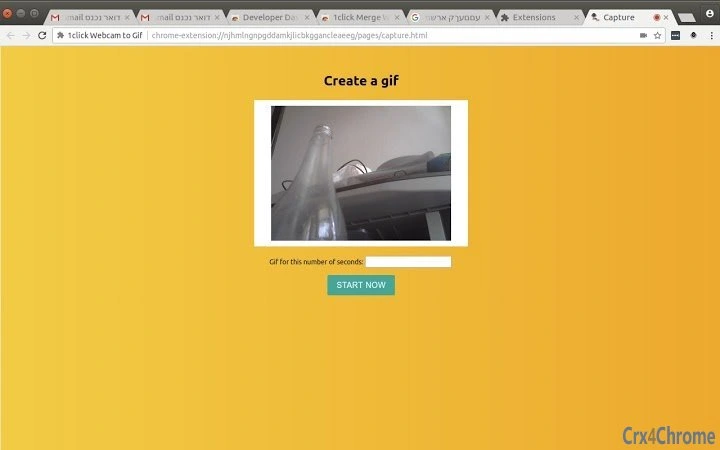
The user interface is minimal and browser-integrated, appearing as a pop-up tab after the extension is activated. Navigation is straightforward: users grant camera access, set the desired GIF duration, and initiate recording with a single button. The interface provides real-time preview of the webcam feed, allowing users to adjust framing before recording.
Workflow efficiency is high, with the entire process—from launch to download—completed in under 30 seconds. The extension operates entirely within the browser environment, relying on client-side processing. This reduces dependency on external services and enhances responsiveness.
Performance details were not specified by the developer. However, given the lightweight nature of the tool (1.5 MB) and its reliance on browser APIs, it is expected to run efficiently on modern systems. Resource usage, including CPU and RAM behavior, was not provided. Stability is assumed to be consistent, as the tool performs a single, focused task without complex background operations.
Compatibility & System Requirements
The software is compatible with Windows, Mac, and Linux operating systems, ensuring broad accessibility across desktop platforms. It functions as a browser extension, requiring a modern web browser with support for WebRTC and media recording APIs.
Installation size is 1.5 MB, indicating a lightweight footprint. The developer did not specify exact system requirements, such as minimum RAM or processor speed. Compatibility information was partially provided, with no mention of older operating system versions or specific hardware dependencies.
Users should ensure their browser is up to date to support the necessary APIs. No additional software or plugins are required beyond the browser and the extension itself.
Pros and Cons
Pros
- Open-source with transparent codebase for security and trust
- Privacy-focused—no data leaves the user’s device
- Simple, intuitive interface with minimal steps to create a GIF
- Free to use with no hidden costs or subscriptions
- Lightweight at just 1.5 MB, suitable for low-resource systems
Cons
- No advanced editing features such as trimming or effects
- Dependent on browser support and availability of WebRTC
- Limited to GIF output format—no MP4 or other video formats
- Exact performance metrics not provided by the developer
- Requires a web browser to run, not a standalone desktop application
FAQ Section
Is this software safe to use?
Yes. The extension is open-source, meaning the code is publicly available for review. No data is recorded or transmitted. All processing occurs locally on your machine.
Can I use this tool without an internet connection?
Yes. The extension functions offline after installation. The recording and file generation happen entirely on your device, requiring no internet connection during use.
What operating systems does it support?
The software is compatible with Windows, Mac, and Linux. It runs as a browser extension and does not require a standalone installer.
Is there a license type for this software?
As an open-source extension, it is distributed under a permissive license. The exact license type was not specified in the provided information.
How often are updates released?
Update frequency is not publicly disclosed. However, being open-source, the community may contribute improvements, and the developer may release updates as needed.
Final Thoughts
Creating animated content from a webcam has never been simpler. This tool delivers a focused, secure, and efficient solution for generating GIFs directly in the browser. Its open-source foundation and privacy-first design make it a trustworthy choice for users who value transparency and data control. While it lacks advanced editing features, its simplicity is its strength—ideal for quick, on-demand visual communication.
Professionals, students, and casual users alike can benefit from its ease of use and zero cost. The lack of system requirements and minimal file size ensure broad accessibility. For those seeking a secure, no-frills way to capture and share short video clips, this extension stands out in a crowded space.
Download Create GIFs from Webcam Instantly now to start creating your own animated content in seconds.
Guides & Tutorials for 1click Webcam to Gif Extension for Chrome
How to install 1click Webcam to Gif Extension for Chrome
- Click the Preview / Download button above.
- Once redirected, accept the terms and click Install.
- Wait for the 1click Webcam to Gif Extension for Chrome download to finish on your device.
How to use 1click Webcam to Gif Extension for Chrome
This software is primarily used for its core features described above. Open the app after installation to explore its capabilities.
User Reviews for 1click Webcam to Gif Extension for Chrome 0
No reviews found





